Completed

Create more organized output directories for test runs.


Ken Dougal

Aug 12, 2025, 14:38 GMT-5

Sorry if I am not clear. I want to organize output from 50 tests all producing snapshots and video, with different test runs - Regression, FAT, one-offs, etc. All of the output files in one folder is not really helpful. I have to go through all those files and copy and paste them to new folders that I have to name... manually. I would like a way to stay better organized and be able to find files easily from a particular execution set / test type and a particular test.


Firas Khalili (Subject7)

Aug 12, 2025, 07:08 GMT-5

Hi Ken,
 
Would you please elaborate more on this request as screenshots and video files are already stored in backend. Why the need to store them in a different location for regression?
 
 
Regards,
Subject7 Team


Ken Dougal

Aug 11, 2025, 14:55 GMT-5

Yes, yes, and right, you covered it, if it generates an Excel file or any output, as well as snapshots taken during the test and the video that was recorded of the tests in the execution set, I would like to keep all of those output files together in an output directory that is organized by date - as in it would help if the directory name had the date in it like 08_11_2025.


Firas Khalili (Subject7)

Aug 11, 2025, 10:58 GMT-5

Hi Ken,
 
I'm not sure I fully understood your request. Are you looking to download the 'output files' to a specific directory/path based on the regression test being executed? For example, if your test case generates an Excel file, should that file be downloaded to a particular folder or location?
 
Also, you mentioned that "there could be other output files that we want to save" Could you please clarify whether these files are generated/downloaded as part of your test case steps?


Regards,
Subject7 Team


Ken Dougal

Aug 11, 2025, 10:04 GMT-5

This might just be a training issue for us but we are starting scheduled nightly runs of our execution sets. In our tests, we take snapshots of the screen and there could be other output files that we want to save. Right now I believe all the video that is recorded of a test run in the cloud is put into the same folder. For our regression testing, is there a way to specify that the output folder path would be say c:\MySubject7Output\RegressionResults\<Date>\ (where Date is replaced with the date the execution set ran)? I would also like a similar functionality for when we run our Factory Acceptance Testing... c:\MySubject7Output\FAT\<Date> or c:\MySubject7Output\FAT\<sw version to release>.

0
3 comments

Official comment

Avatar
Firas Khalili

Hi Ken,

In our latest release, 10.5.16 we have introduced the ability to download all artifacts generated by the test execution as seen in the screenshots below.
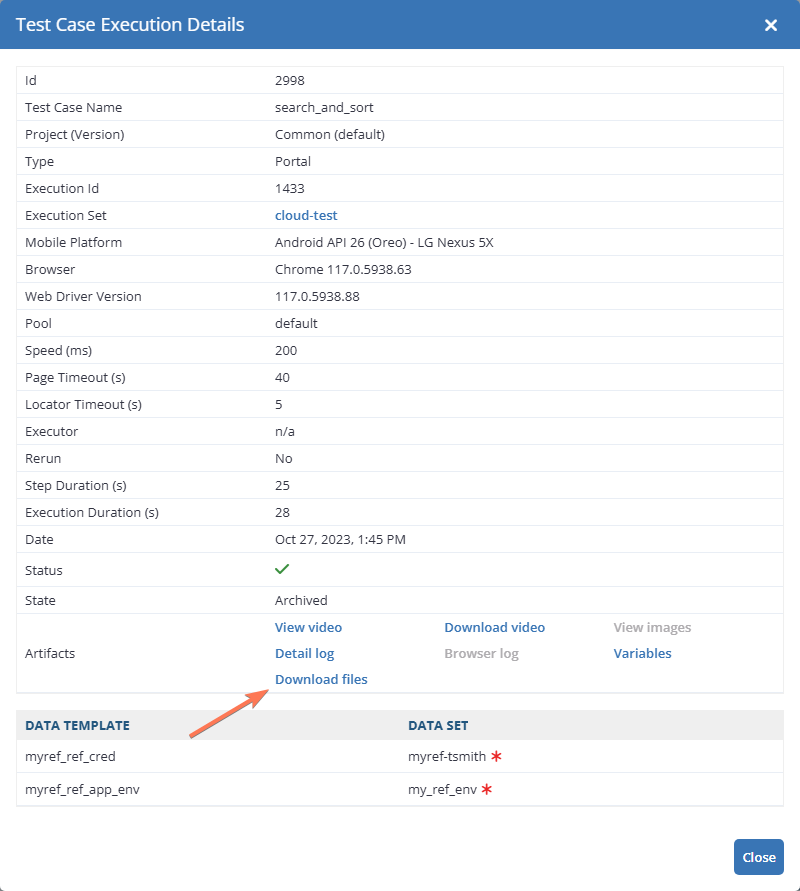
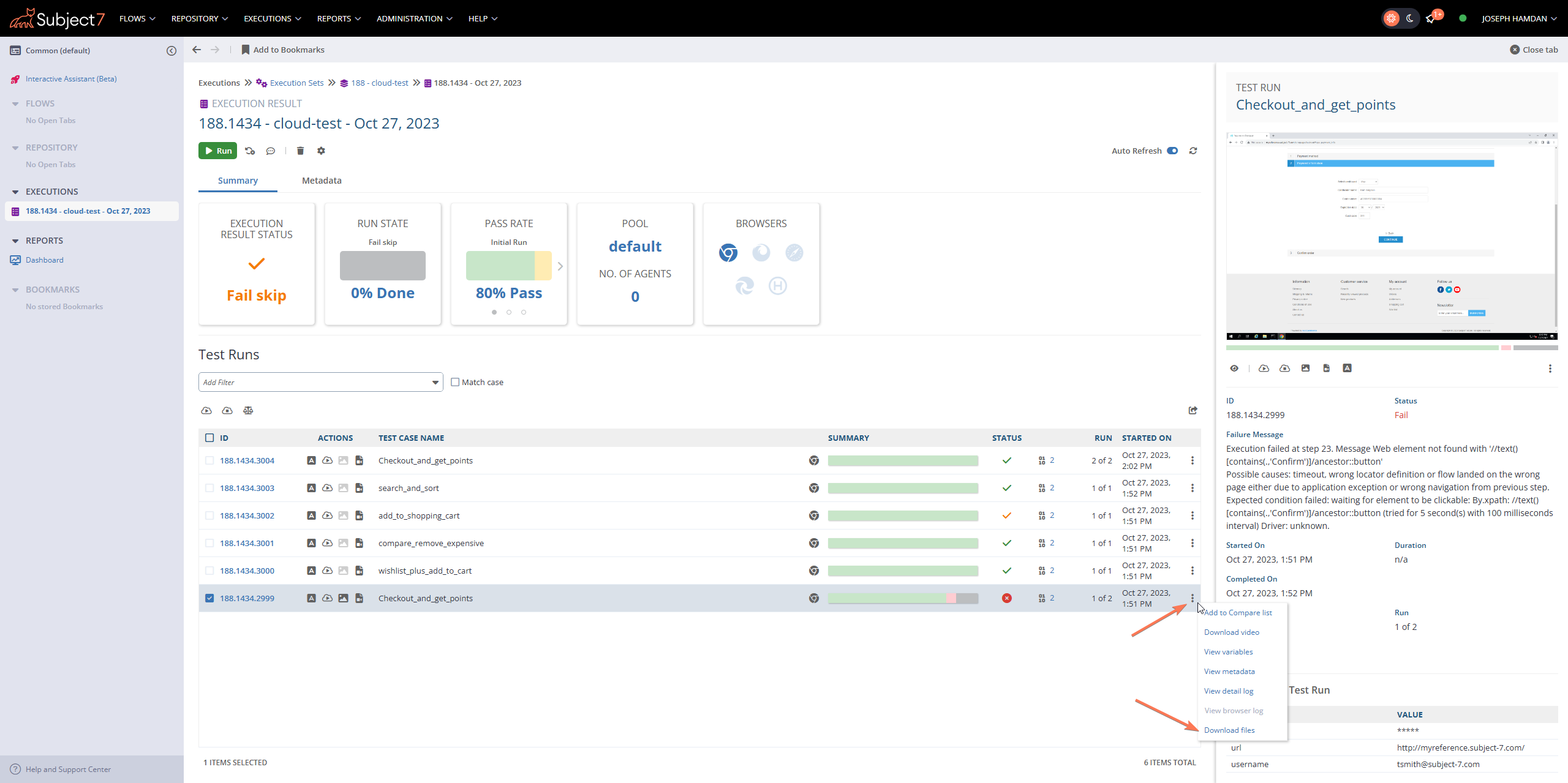
Regards,
Subject7 Team

Comment actions Permalink
Avatar
Firas Khalili

Hi Ken,

Thank you for creating this feature request. I have added an internal request and will keep you posted with updates as soon as they are available.


Regards,
Subject7 Team

0
Comment actions Permalink
Avatar
Ken Dougal

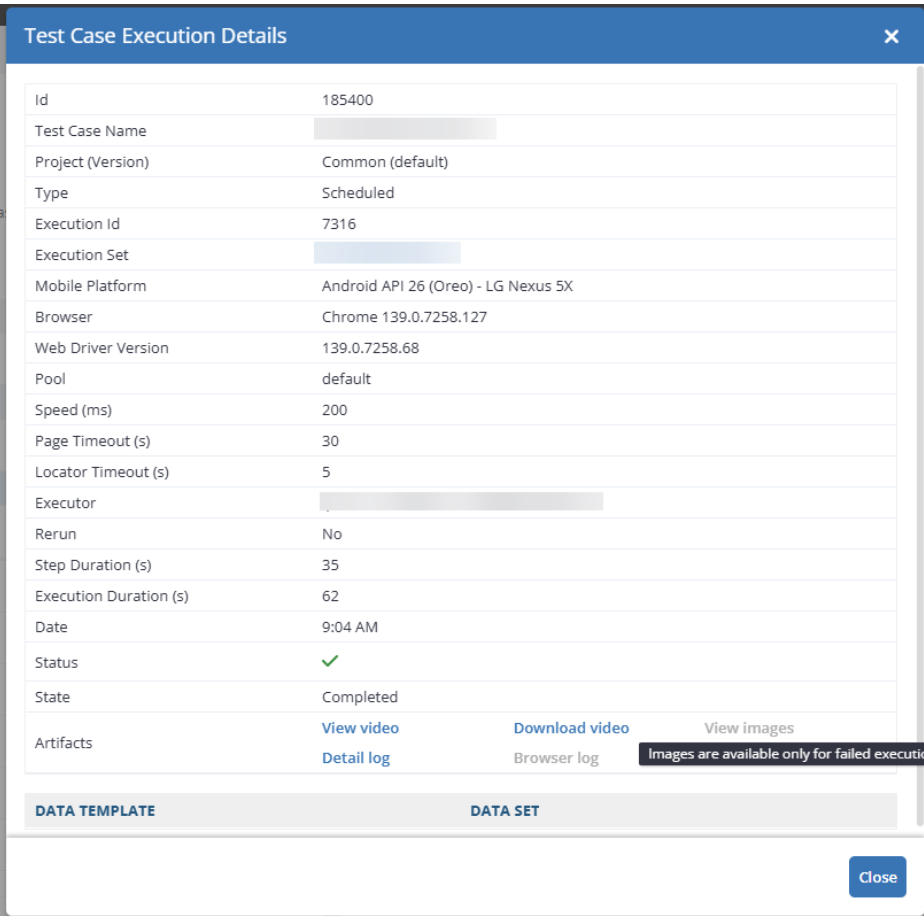
I recently came across this window:

It would make sense that in the artifacts section, a link were made to the snapshots taken for this test.  Both Error and ones that we use the snapshot command for.

0
Comment actions Permalink

Please sign in to leave a comment.